
Fileshaper
A free file toolbox that never uploads your files.
149 MB → 9.1 MBA 40-second 4K clip, compressed to fit Discord’s 10 MB limit
−88%A PNG screenshot saved as a JPG that looks the same
21End-to-end checks that drive the real app
The problem
Everyday file jobs, like shrinking a video for Discord, opening an iPhone HEIC photo or signing a PDF, usually end up on upload websites. They come with queues, watermarks and paywalls, and the files are often private: ID scans, contracts, personal photos.
Desktop alternatives exist, but they are either one-job tools or professional software with a learning curve.
What it does
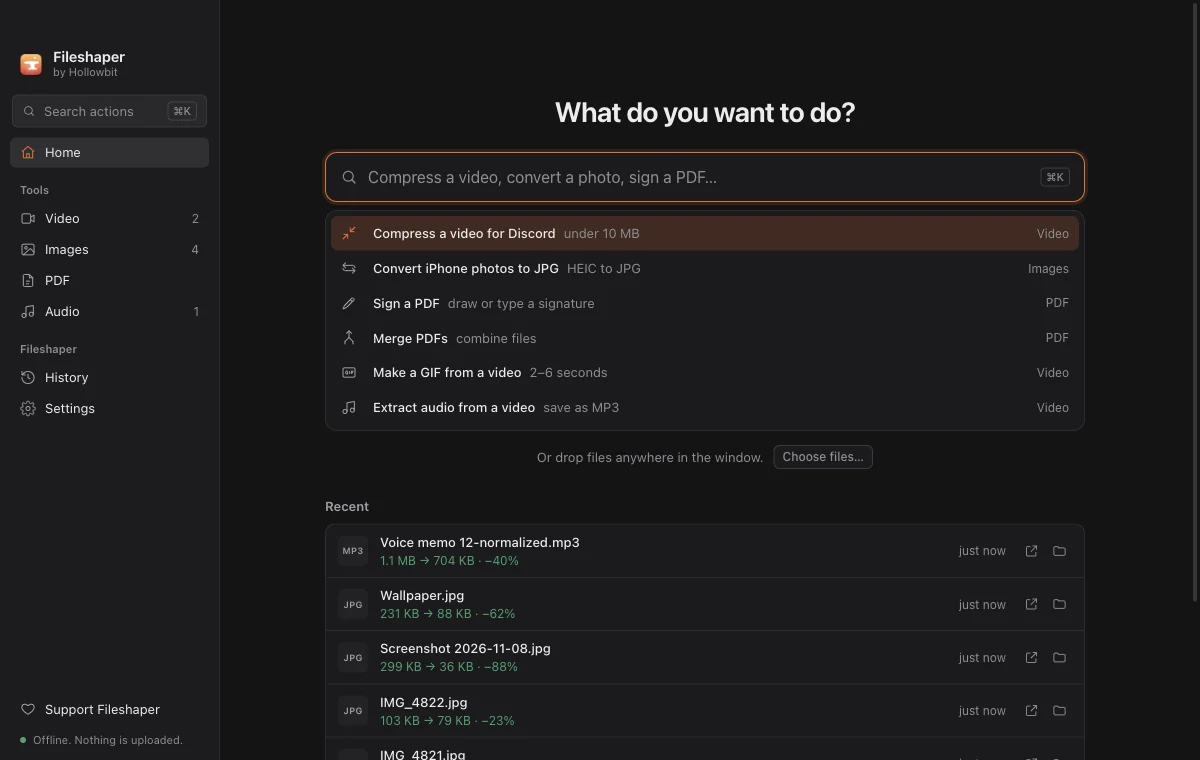
Fileshaper puts the common video, image, PDF and audio jobs in one app that works offline. Compress to a size limit, trim, make GIFs, convert HEIC, resize, merge and split PDFs, sign and fill them, convert and normalise audio. The website also has browser versions of several tools for people who can’t install apps.
Key decisions
- Type the job, not the menu. The home screen is a command field: type “compress for discord” and the right tool opens. Cmd/Ctrl+K reaches every tool from anywhere.
- Size targets instead of quality sliders. People know the limit (8, 10, 25 MB), not a bitrate. Fileshaper uses two-pass encoding to land just under the number they pick.
- Originals are never changed. Every result is saved as a new file next to the original, so nothing can be lost by accident.
- Browser tools that still upload nothing. The website’s tools run on self-hosted ffmpeg.wasm, pdf-lib and PDF.js, so even the web version keeps files on the device.
- A name that says what it does. The app launched as “Filesmith”, then was renamed once an older product with a similar name and pitch turned up. Every later name went through a stricter check: domains, GitHub, app stores and a web search.
How it was tested
- 21 Playwright end-to-end checks open the real app and run its tools on generated test media: videos, HEIC photos, PDFs and audio.
- Separate checks cover the browser tools, the animations, and screenshots of the website in all 6 languages.
- The compression numbers on this page come from those test files.
What’s next
- Signing the app with Apple and Microsoft certificates, so the first launch shows no warning.
- Testing on more Windows PCs.
- Translating the app itself, not just the website.